> For the complete documentation index, see [llms.txt](https://docs.uniplay.id/uniplay-reseller/llms.txt). Markdown versions of documentation pages are available by appending `.md` to page URLs; this page is available as [Markdown](https://docs.uniplay.id/uniplay-reseller/kustomisasi/cara-build-apk.md).

# Cara Build APK

Build APK adalah fitur di mana Kamu bisa membuat sebuah aplikasi Android dari website top up game yang sudah Kamu buat.

Untuk menggunakan fitur Build APK, Kamu bisa ikuti langkah-langkahnya berikut ini.

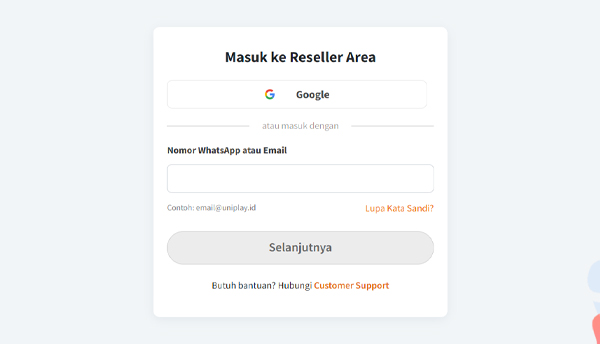
* Mula-mula, silahkan login ke dalam panel Reseller UniPlay terlebih dahulu.

<figure><img src="/files/Zk8khAW71SW7UmkRBwQo" alt=""><figcaption></figcaption></figure>

* Sebelum membuat APK, pastikan kamu sudah [aktifkan fitur 2FA](/uniplay-reseller/akun-saya/keamanan-akun/cara-hubungkan-google-authenticator.md).
* Jika sudah aktifkan fitur 2FA, silahkan klik menu Kustomisasi dan pilih sub menu **Build APK** yang ada di bagian kiri Panel Reseller.

<figure><img src="/files/UrLJrQEIEbIrV34AEk05" alt=""><figcaption></figcaption></figure>

* Nah, sekarang kamu tinggal isi detail dari aplikasi yang ingin dibuat seperti isi Nama Aplikasi, Logo Aplikasi (Ukuran 512 x 512 px maksimal 1MB), dan Splash Screen (Ukuran rasio 9:16. Maksimal 2 MB).

<figure><img src="/files/4FMX79ki0gyPRQCgCno7" alt=""><figcaption></figcaption></figure>

* Jika sudah mengisi semua, silakan klik tombol Submit.

<figure><img src="/files/KsmkcIldahPasFWxvdGz" alt=""><figcaption></figcaption></figure>

> **Informasi Tambahan:**
>
> 1. Pembuatan APK membutuhkan waktu 2x24 Jam di hari kerja.
> 2. Jika APK sudah siap digunakan, kamu akan diberikan notifikasi ke WhatsApp yang terdaftar menjadi Reseller.
> 3. Permintaan build APK hanya dapat dilakukan per 30 hari.

* Jika muncul notifikasi ini, silakan pilih **Konfirmasi**. Tapi pastikan bahwa data yang kamu cantumkan sudah sesuai dengan yang kamu inginkan.

<figure><img src="/files/bX9Qu06GnUHFrTYluaM3" alt=""><figcaption></figcaption></figure>

* Setelah itu, akan muncul pop up untuk mengisi kode OTP dari aplikasi Authenticator. Silakan isi kode OTP.

<figure><img src="/files/UOtFIVCbO533rIMSlQER" alt=""><figcaption></figcaption></figure>

* Jika sudah berhasil, kamu tinggal tunggu proses pembuatan build APK yang dilakukan oleh tim UniPlay. Dan jika APK kamu sudah jadi, kamu akan dikirimkan notifikasi dan kamu bisa download file APK-nya di menu ini.
<figure><img src="/files/WdZ7srC62uaaQ83lNaP1" alt=""><figcaption></figcaption></figure>


---

# Agent Instructions
This documentation is published with GitBook. GitBook is the documentation platform designed so that both humans and AI agents can read, navigate, and reason over technical content effectively. Learn more at gitbook.com.

## Querying This Documentation
If you need additional information that is not directly available in this page, you can query the documentation dynamically by asking a question.

Perform an HTTP GET request on the current page URL with the `ask` query parameter, and the optional `goal` query parameter:

```
GET https://docs.uniplay.id/uniplay-reseller/kustomisasi/cara-build-apk.md?ask=<question>&goal=<endgoal>
```

`ask` is the immediate question: it should be specific, self-contained, and written in natural language.
`goal` is optional and describes the broader end goal you are ultimately trying to accomplish on behalf of the user. GitBook uses it to tailor the answer towards what is most useful for that goal.

The response will contain a direct answer to the question and relevant excerpts and sources from the documentation.

Use this mechanism when the answer is not explicitly present in the current page, you need clarification or additional context, or you want to retrieve related documentation sections.
